

Using the CLI
ouster-cli provides several commands for working with Zone Monitor from the command line. The commands below use the following placeholders:
$SOURCE— a sensor hostname or IP address, or a path to a recorded PCAP or OSF file.$CONFIG_ZIP— a zone set configuration zip file. See Creating a ZoneSet using the SDK for how to create one.
Emulating Zones
The SDK’s Zone Monitor Emulation feature enables testing Zone Monitor configurations with or without a sensor. ouster-cli provides a chainable emulate_zones command for this purpose, optionally accepting a zone set zip file as input. (If no zone set is provided, the command uses the zone set from the source, if one is present.)
ouster-cli source {SOURCE} emulate_zones -c {CONFIG_ZIP} save {OUTPUT_FILE}.osf
For example, to visualize the emulated configuration, run
ouster-cli source {SOURCE} emulate_zones -c {CONFIG_ZIP} viz
Visualization
The Ouster CLI displays live zones by default for a source with Zone Monitor enabled (i.e., a valid zone set is active on the sensor and zone monitor packets have a valid UDP destination). To launch the visualizer, run:
ouster-cli source {SOURCE} viz
Visualization Controls
The zone selection mode specifies whether the visualizer should display only live zones (the default), all zones, or no zones. To cycle the value of the selection mode, press the Y key.
The zone render mode specifies which representation of a zone’s geometry the visualizer should display: STL wireframe meshes, ZRB point clouds representing near and far points, or a “voxel” wireframe mesh representing a 3D area the zone occupies in rendered form. To cycle the zone render mode, press CTRL+Y.
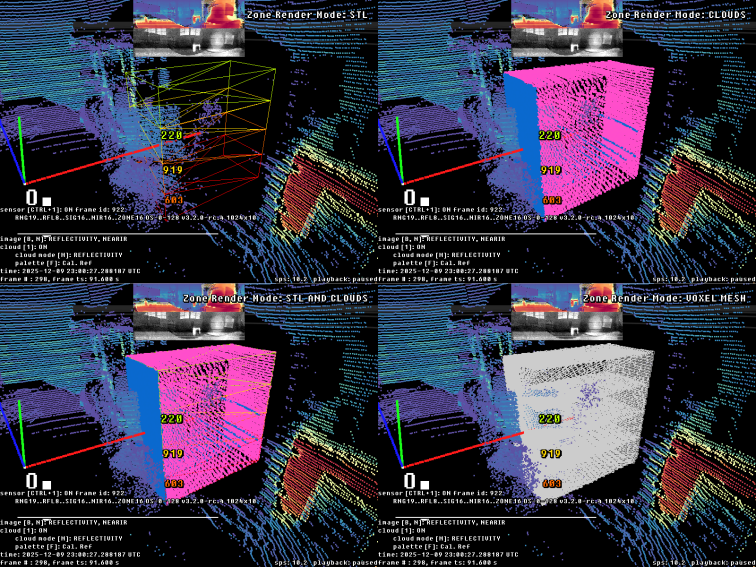
The four render modes
Starting in 0.16.0, the visualizer also has a new “flags mode” called Highlight Zones. To select it, press the C key until the Highlight Zones mode is active, and the visualizer will colorize the LiDAR points according to which zone they occupy. (Points that occupy multiple zones will only get the color of one of the zones.)
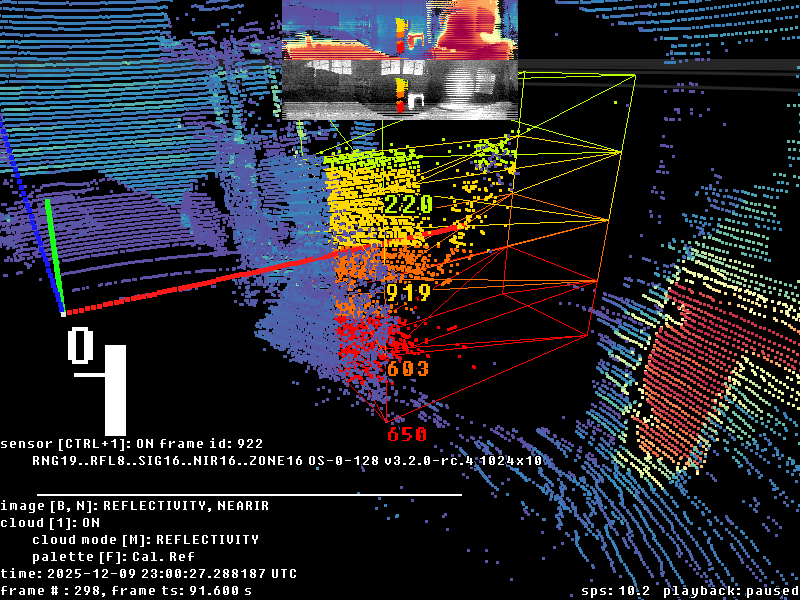
Highlighting points according to zone occupancy