

Using the Visualizer
It’s easier than ever to use “map” or “frame”
accumulation to visualize lidar frames that contain pose information. The
default visualizer, SimpleViz, present in both ouster-cli and Ouster
SDK’s Python API support these accumulation modes out of the box.
Furthermore, when poses are not present in the LidarFrame accumulation may
still be useful to view the accumulated N frames from the live
sensor/recording and reveal the accuracy/repeatability of the data.
Slam Viz command
The viz command enables visualizing the accumulated point cloud generation during the
SLAM process. By default, the viz operates in looping mode, meaning the visualization will
continuously replay the source file.
ouster-cli source <SENSOR_HOSTNAME> / <FILENAME> slam viz
When combining the viz and save commands, the saving process will automatically terminate
after the first iteration, and then the SLAM process restarts for each subsequent lidar frame iteration.
To end the SLAM and visualization processes after the save operation completes, you can use ctrl + c.
Alternatively, you can add -e exit to the viz command to terminate the process after a
complete iteration.
ouster-cli source <SENSOR_HOSTNAME> / <FILENAME> slam viz -e exit save sample.osf
Accumulation: The viz command supports several options for creating visually-pleasing maps by accumulating data from lidar frames that contain pose information. The following sections describe the options and provide usage examples.
Available view modes
There are three view modes of accumulation implemented in the default visualizer that may be enabled/disabled depending on its parameters and the data that is passed through it:
Mode |
Description |
Toggle key |
|---|---|---|
poses |
Displays all frame poses in a trajectory/path view when pose data is available in the frames. |
|
map accumulation |
Overall map view with select ratio of random points from every frame; works with or without pose data. |
|
frame accumulation |
Accumulates N key-frame frames according to the configured parameters; works with or without pose data. |
|
CLI viz accumulation options
frame accumulation options
--accum-num INTEGERAccumulate up to this number of past frames for visualization. Use <= 0 for unlimited. Defaults to 100 if--accum-everyor--accum-every-mis set.--accum-every INTEGERAdd a new frame to the accumulator for every specified number of frames as an argument in this option.--accum-every-m FLOATAdd a new frame to the accumulator after specified number of meters of travel.
map accumulation options
--mapIf set, add random points from every frame into an overall map for visualization. Enabled if either--map-ratioor--map-sizeare set.--map-ratio FLOATFraction of random points in every frame to add to overall map (0, 1]. [default: 0.01]--map-size INTEGERMaximum number of points in overall map before discarding. [default: 1500000]
Key bindings
The following key shortcuts apply to accumulation options while running Ouster CLI’s viz command.
Key |
Accumulation Mode |
What it does |
|---|---|---|
|
Frame |
Toggle frames accumulation view mode. |
|
Map |
Toggle overall map view mode. |
|
Frame & Map |
Toggle poses/trajectory view mode. |
|
Frame & Map |
Cycle point cloud coloring mode of accumulated clouds or map. |
|
Frame & Map |
Cycle point cloud color palette of accumulated clouds or map. |
|
Frame & Map |
Increase/decrease point size of accumulated clouds or map. |
Dense accumulated clouds view (with every point of a frame)
To obtain the densest view use the --accum-num N --accum-every 1 parameters where N is the
number of clouds to accumulate (N up to 100 is generally small enough to avoid slowing down
the viz interface.)
The following example computes poses for each frame using the slam command and creates a dense
map using the viz --accum-num 20 to accumulate the points from 20 frames. Finally, the save command writes the
frames with their computed trajectories to an OSF file. (Note - accumulation is a visualization feature only. The
accumulated data is not saved to the file.):
ouster-cli source <SENSOR_HOSTNAME> / <FILENAME> slam viz --accum-num 20 save sample.osf
and the dense accumulated clouds result:
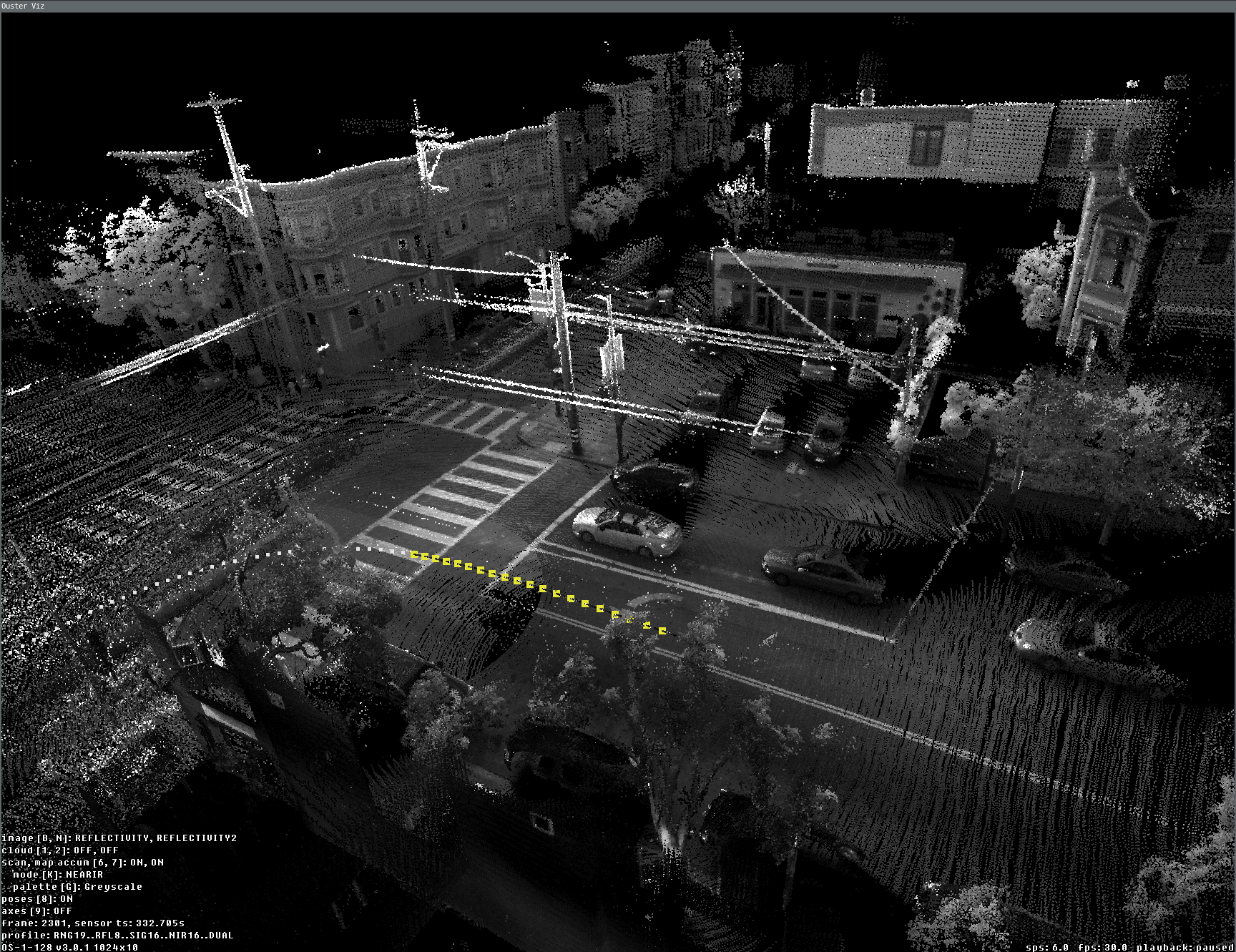
Dense view of 20 accumulated frames during the slam viz run
Overall map view (with poses)
One of the main tasks we frequently need is a preview of the overall map. We can test this by using
the SLAM-generated OSF file, which was created with the above command and contains the
SLAM trajectory in LidarFrame.body_to_world. If you are using a SLAM-generated OSF, you can directly use
viz with frame accumulator feature without appending the slam option.
ouster-cli source ouster_sensor_recording.osf viz --accum-num 20 \
     --accum-every-m 10.5 --map -r 3 -e stop
Here is a preview example of the overall map generated from the accumulated frame results. By utilizing the ‘-e stop’ option, the visualizer stops once the replay process finishes, displaying the preview of the lidar trajectory:
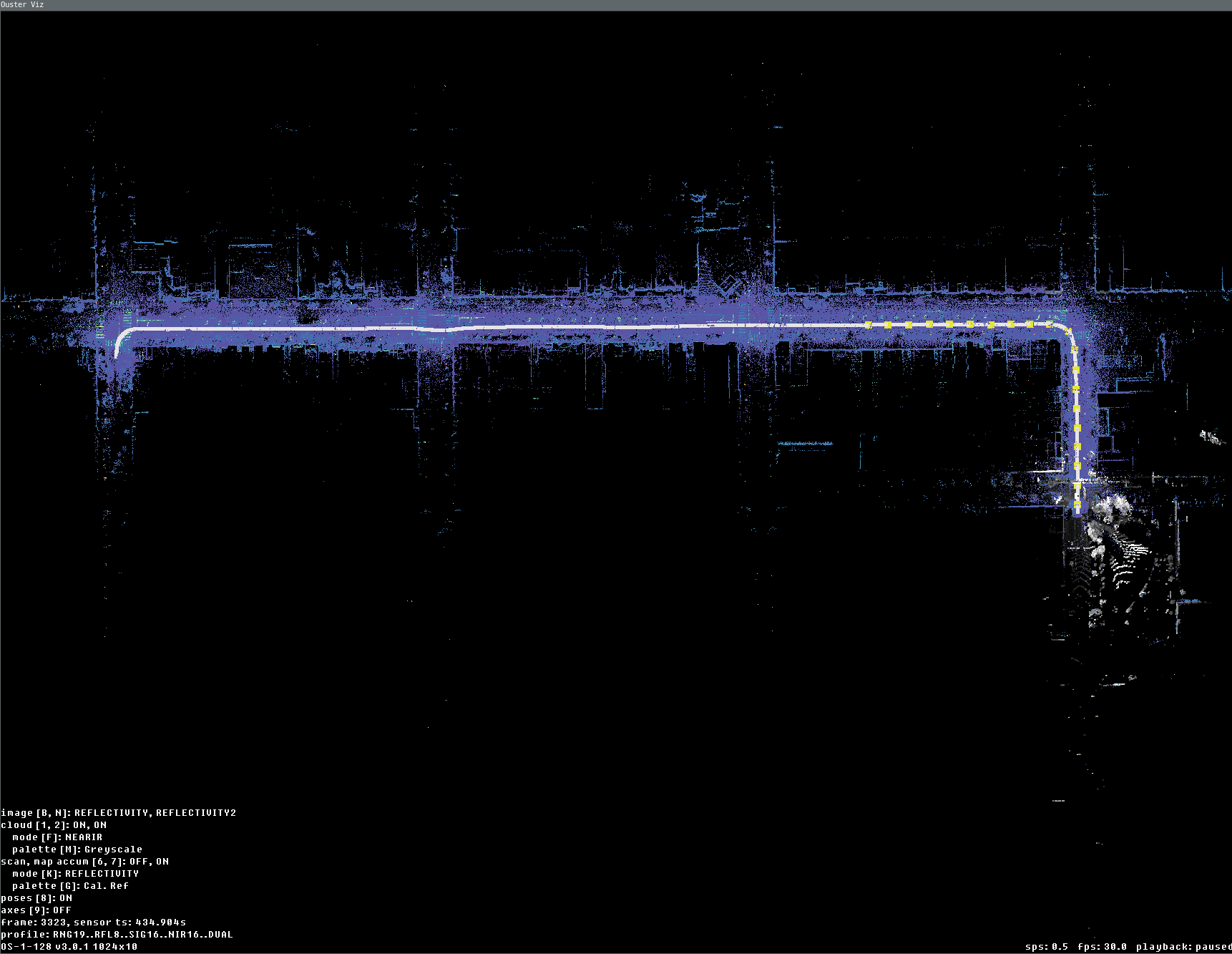
Data fully replayed with map and accum enabled (last current frame is displayed here in gray palette)
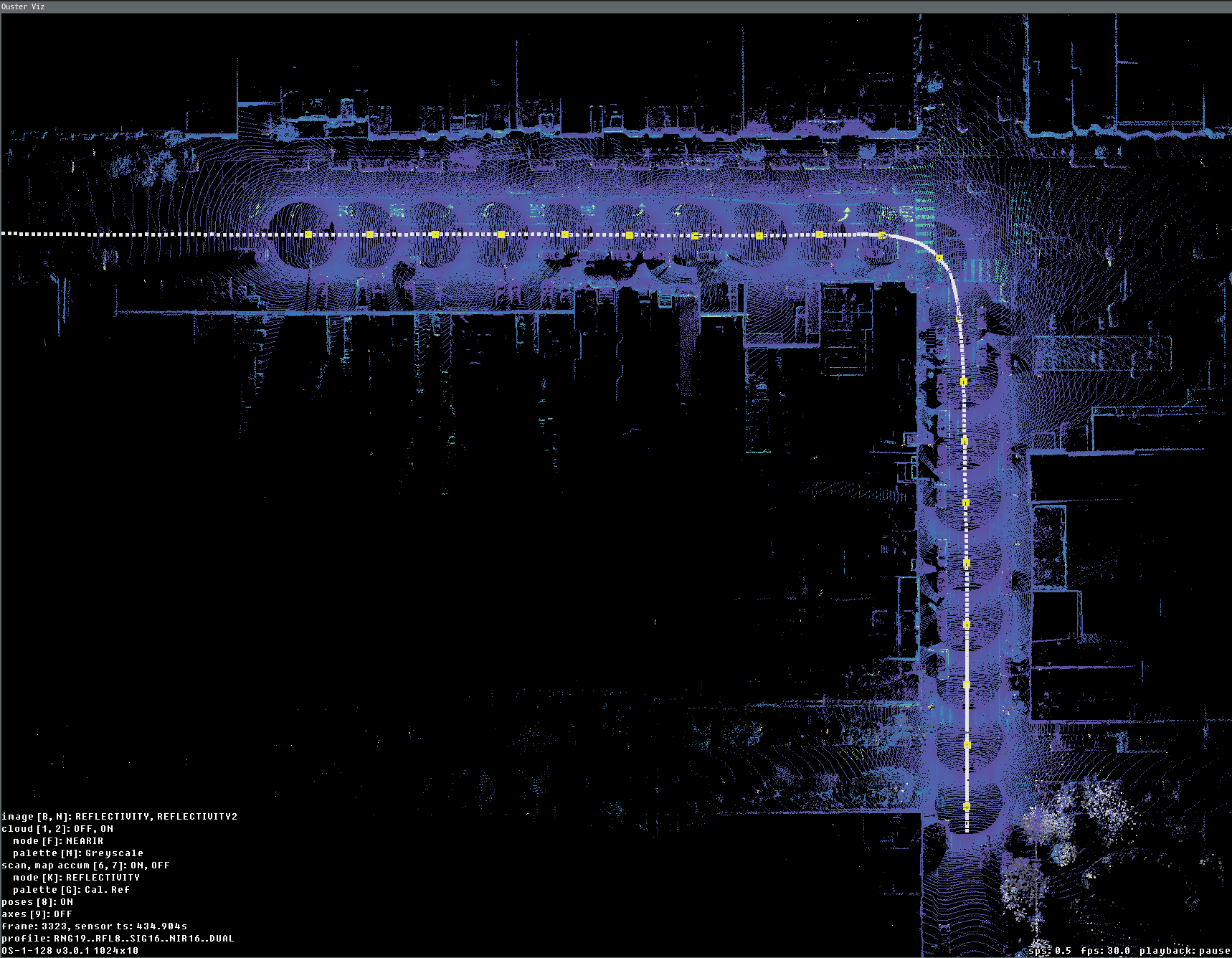
Data fully replayed with view only last 20 frames accumulated every 10.5 meters
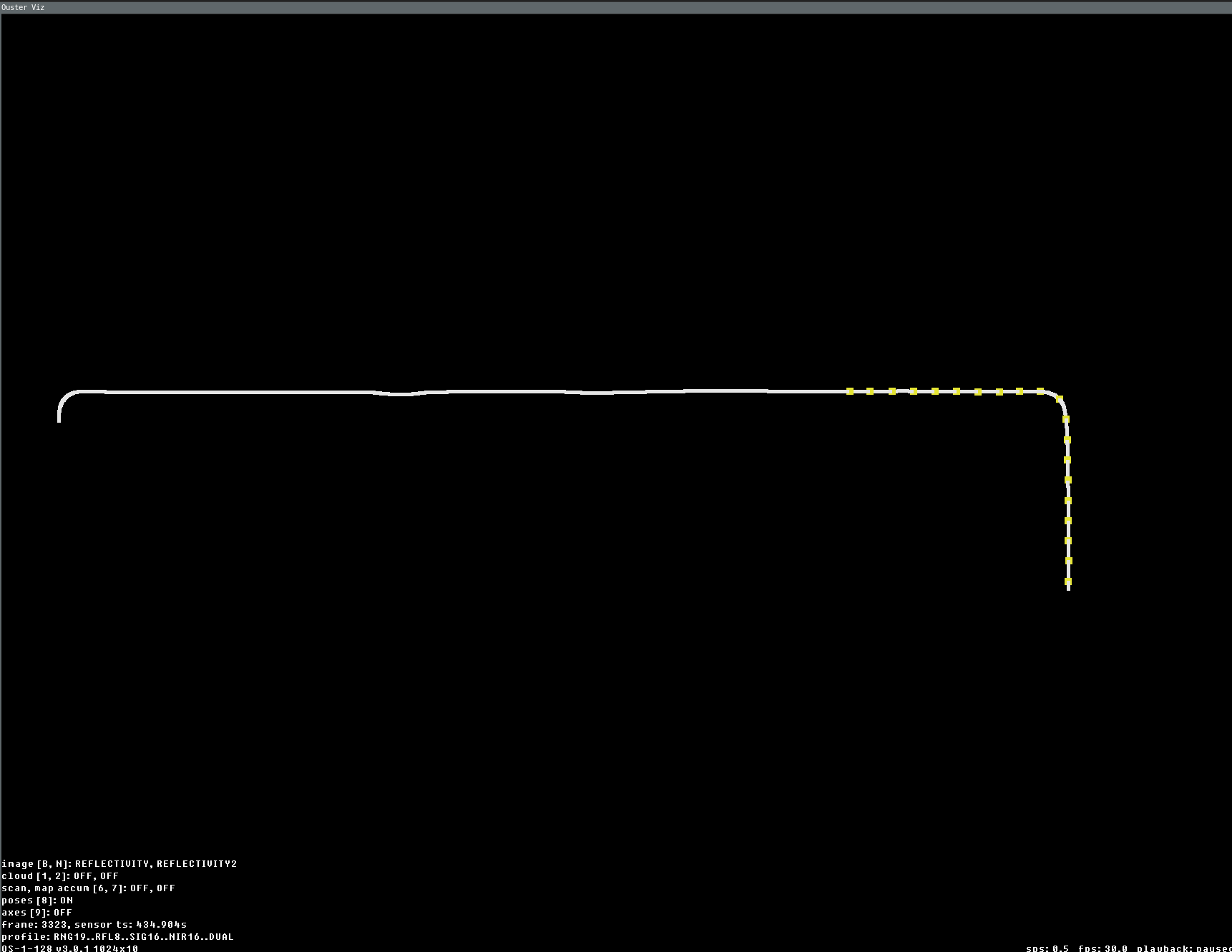
Data fully replayed with view of only trajectory (yellow knobs are 20 accumulated key frames positions)
Vizualization using Python API
The following examples show how to compute SLAM poses and visualize frame accumulation modes directly from Python.
SimpleViz with frame accumulation
from ouster.sdk import open_source
from ouster.sdk.viz import SimpleViz
from ouster.sdk import mapping

source_uri = sys.argv[1]
source = open_source(source_uri)
config = mapping.SlamConfig.create("lio")
slam = mapping.SlamEngine.create(source.sensor_info, config)

def frames_w_poses():
    for frame in source:
        yield slam.update(frame)

viz = SimpleViz(
    source.sensor_info,
    accum_max_num=100,
    accum_min_dist_num=0,
    accum_min_dist_meters=4,
    rate=1,
    on_eof='stop'
)

viz.run(frames_w_poses())
LidarFrameViz with accumulators config
from ouster.sdk import open_source
from ouster.sdk.viz import LidarFrameViz
from ouster.sdk.viz.accumulators_config import LidarFrameVizAccumulatorsConfig
from ouster.sdk import mapping

source_uri = sys.argv[1]
source = open_source(source_uri)
config = mapping.SlamConfig.create("lio")
slam = mapping.SlamEngine.create(source.sensor_info, config)

num_frames_to_map = 200
frames_w_poses = [
    slam.update(frame) for _, frame in
    zip(tqdm(range(num_frames_to_map), desc="Computing map"), source)
]
viz = LidarFrameViz(
    source.sensor_info,
    accumulators_config = LidarFrameVizAccumulatorsConfig(
        accum_max_num=100,
        accum_min_dist_num=0,
        accum_min_dist_meters=4
    )
)

for frame in frames_w_poses:
    viz.update(frame)

viz.draw(update=True)
viz.run()