

Ground Segmentation
Ground Segmentation classifies lidar returns as ground or non-ground. The
result is stored directly on each frame as a uint8 mask: 1 means ground
and 0 means non-ground. The first-return mask is named GROUND and the
optional second-return mask is named GROUND2.
Users can visualize the mask, remove ground points before object detection or
mapping, or reuse it during point cloud alignment. Use the ground CLI
command to annotate a stream of frames, or use
GroundSegEngine
to add the mask inside a Python or C++ processing pipeline.
When used with viz, the visualizer can highlight the segmented ground in
the point cloud while keeping the image panels available for comparison:
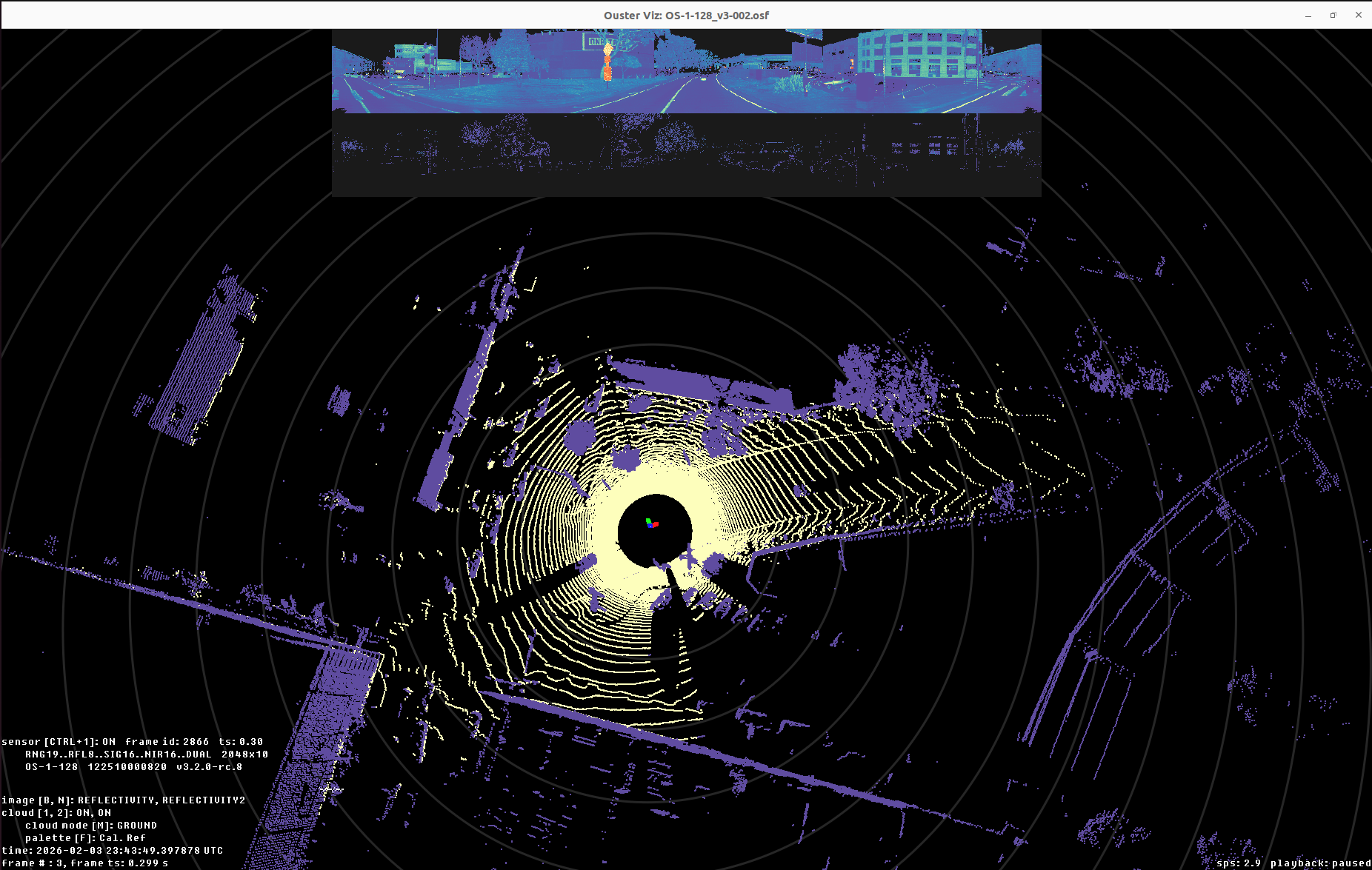
Ouster Viz displaying the output of the ground command.
Using the CLI
The chainable ground command segments every frame and makes the mask
available to downstream commands such as viz:
ouster-cli source {OSF_PATH} ground viz
For the best results, ground expects the input sensor extrinsics to be
aligned with gravity. If the recording contains IMU data from sensors running
FW 3.2 or later, run plumb before ground to calculate the
gravity-aligned extrinsics:
ouster-cli source {SOURCE_PATH} plumb ground viz
For moving recordings, especially handheld recordings, run slam before
ground segmentation. SLAM supplies a pose for each frame column so the ground
model is built in a consistent global frame:
ouster-cli source {SOURCE_PATH} plumb slam ground viz
Using the API
Create a
GroundSegEngine
and pass each FrameSet to update().
The engine modifies the frames in place but does not calculate gravity
alignment. Before reading frames, assign each sensor a
SensorInfo.sensor_to_body whose frame is aligned with gravity. In this
frame, ground surface normals should point along the positive Z axis. The
examples assume plumb_extrinsics contains these gravity-aligned
transforms.
source = open_source(source_file)
for info, extrinsic in zip(source.sensor_info, plumb_extrinsics):
    info.sensor_to_body = extrinsic

frame_set = next(iter(source))
engine = GroundSegEngine.create()

engine.update(frame_set)
ground_mask = frame_set[0].field(  # type: ignore[union-attr]
    core.ChanField.GROUND)
auto source = open_source(source_file);
for (std::size_t i = 0; i < source.sensor_info().size(); ++i) {
    source.sensor_info()[i]->sensor_to_body = plumb_extrinsics[i];
}

auto frames = *source.begin();
auto engine = GroundSegEngine::create();

engine->update(frames);
auto ground_mask = frames[0]->field<uint8_t>(core::ChanField::GROUND);